Introduction
Overview
About Hercules
Hercules is a data editing tool used to work with design and configuration data for software projects (games included). It provides many editing options.
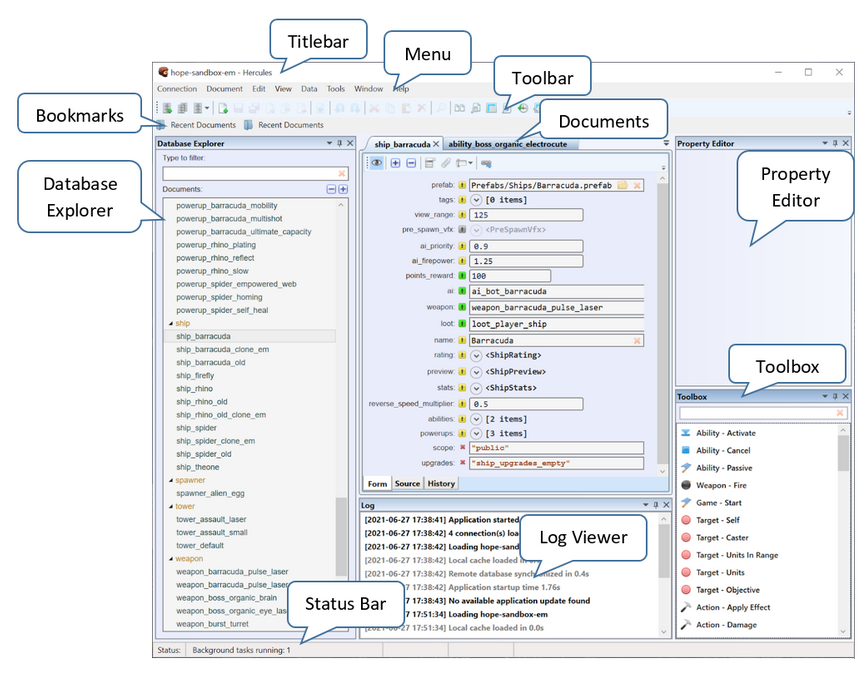
This is an overview of Hercules main window:
Main Features
Schema-powered rich data editing forms with input validation
Highlighting of modified fields
Source view for direct editing of JSON data
Bulk document editing via summary tables
Undo and Redo actions
Quick recovering of deleted documents via trash bin
Data importing from CSV, XLS, JSON, and Google Sheets
Data importing and transformation using JavaScript
Data exporting
Customizable data search tool
Document version control
Exportable database history
Synchronization of document data across databases
Viewing and editing of diagrams
API-powered scripting system for advanced data manipulation
Supported Data Formats
Hercules manages data in a JSON-based document format stored in Apache CouchDB.
Hercules For Game Designers
Universal data editor that works with all kinds of game design data
Lightweight design cycle without technical routines: launching heavy engine editors, submitting changes to version control systems, making builds, performing installations, waiting for playtests to start, and receiving feedback
On-the-fly design changes in single-player and multiplayer sessions
Game backend server may be permitted to access documents
Documents are similar to prefabs in Unity and blueprints in Unreal Engine
Document categories define the different design objects in the game (characters, items, abilities, weapons, etc.)
Ideal for rule-based games, data-driven designs, and massive multiplayer sessions yet less suitable for scripted and story-based games
Compared to Unreal Engine 4 blueprint binary formats, JSON-based documents permit collaboration among multiple users
Encourages creative user input with a possibility to experiment with game design in practice
Naming Rules and Conventions in Hercules
To name documents correctly, pay attention to these recommendations:
The name must be unique. A document cannot share the same name with another document.
Only lowercase Latin letters and numbers are allowed.
Capitals are allowed, but we strongly recommend you use lowercase letters.
Underscore (_) is the only special character allowed. Use it to make space.
Special characters and spaces are NOT allowed.
We recommend you prefix the document name with its category (i.e., character, weapon, ability). The category determines the schema in which a document gets formatted and the information it gets to hold.
Installing Hercules
To use Hercules, your machine must be running Windows 10.
This is how you install Hercules:
Get Hercules at https://github.com/toadmaninteractive/hercules/releases/latest/download/hercules_setup.exe.
Run the executable and install the program.